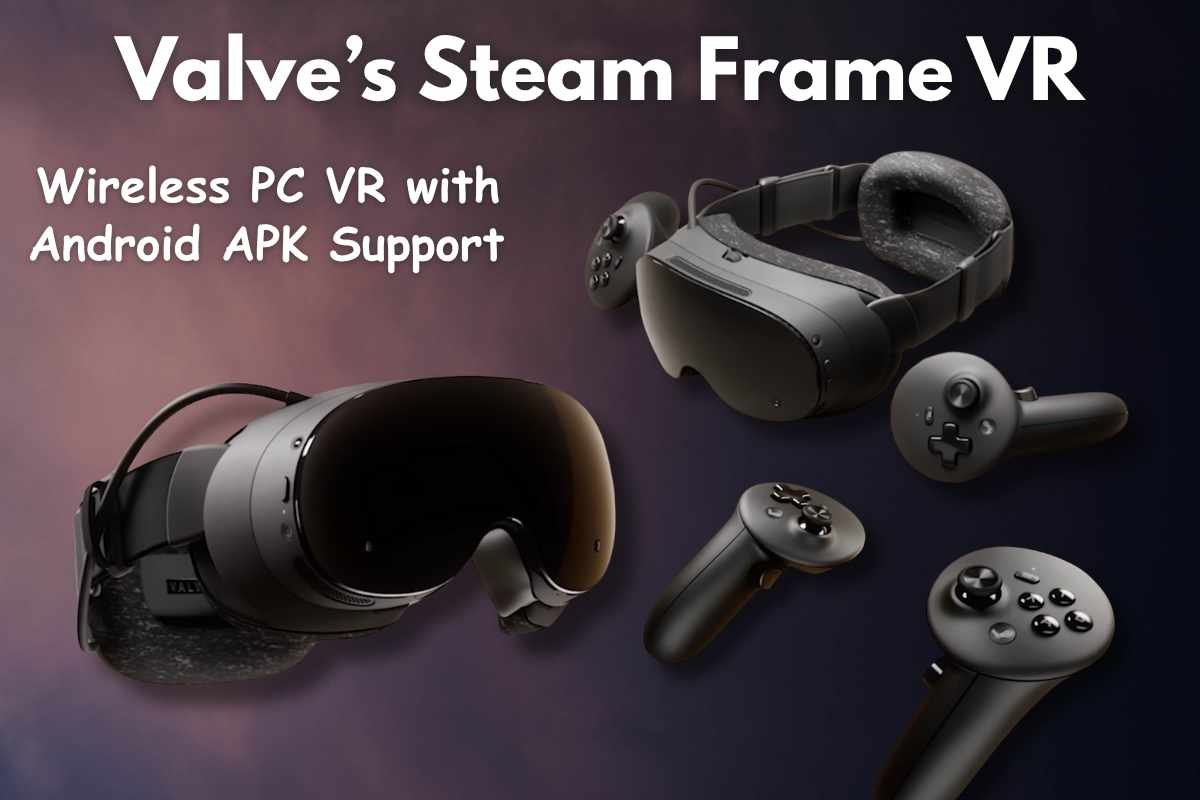
The Steam Frame VR 2026 is Valve’s most advanced VR headset ever. It is not just a VR device. It is also a wireless PC gaming headset, standalone VR console and also an Android-compatible device that can install apps and games.
Let’s explain all the major features of the Steam Frame 2026 about how it works, how it streams games, how it installs Android apps, how it runs SteamOS on Arm with the new Steam Controller, and why it is becoming one of the most searched VR headsets of 2026.
What Is the Steam Frame VR 2026?
The Steam Frame VR 2026 is a next-generation wireless VR headset made by Valve. It is designed to play PC VR games, flat PC games, and standalone games inside the headset. It works with or without a gaming PC.
You can use it in three major ways:
- As a wireless PC VR headset
- As a standalone VR console
- As an Android app device
The Steam Frame is light, comfortable, and built for long sessions. It brings the Steam ecosystem directly into a VR headset.
Wireless PC VR Through Dedicated Wi-Fi 6
One of the biggest features of Steam Frame is wireless PC VR. Valve built a special Wi-Fi 6 streaming system that connects your headset directly to your gaming PC. This connection is not the same as normal Wi-Fi. It is a dedicated, private, high-speed link.
What this gives you:
- Low-latency PC VR
- Stable visual quality
- No cables
- Smooth motion
- Fast response times
You can play big VR games like Half-Life: Alyx completely wirelessly. You can also play flat PC games on a huge virtual screen without any cables.
Standalone SteamOS with Arm Processor
Steam Frame is also a PC by itself. It runs a special version of SteamOS on an Arm chip. This means the headset can:
- Install VR games
- Install non-VR games
- Install Android apps
- Run software
- Save files
- Work completely without a PC
You can use the headset anywhere. You do not need a PC or a cable to enjoy games. This is because Valve included a powerful Arm processor inside the headset.
Android App Support and APK Sideloading
One of the most surprising features is Android app support. Valve confirmed that Steam Frame can run Android APKs. Developers can upload Android VR games to Steam. You can also sideload apps manually.
This means you can play:
- Android VR games
- Android flat-screen games
- Quest-style VR titles
- Apps using APK sideloading
- Tools or utilities not available on PC
Valve’s goal is to attract mobile VR developers to bring their games to Steam.
Camera-Based Inside-Out Tracking
Steam Frame uses camera-based tracking. This means you do not need base stations or external sensors. The cameras built into the headset track your position and your controllers.
Benefits of camera tracking:
- Fast setup
- No extra equipment
- Easy room switching
- Great for small or large spaces
- No wires or wall mounts
This makes the headset extremely user-friendly.
Steam Frame Controllers (Included)
The headset comes with Steam Frame controllers. These controllers are made specifically for VR.
Key features of the controllers:
- Full motion tracking
- Full finger capacitive tracking
- Split gamepad layout
- Comfortable grip
- Next-gen magnetic thumbsticks
- Designed to work with all VR titles
The controllers make VR interactions smoother and more responsive. They also let you play flat PC games in VR using gamepad controls.
Magnetic Thumbsticks for Long Life
Valve added the same high-end magnetic thumbsticks as the Steam Controller 2026. These sticks:
- Do not suffer from stick drift
- Last many years
- Feel smooth and premium
- Respond instantly
- Work perfectly in both VR and non-VR games
These are among the best sticks available on any VR controller.
Full Finger Tracking
The controllers include sensors in the grip and on the buttons that track each finger. This allows:
- Natural VR gestures
- More expressive virtual hands
- Better accuracy
- Better gameplay immersion
This feature is especially important for VR games that require grabbing, throwing, climbing, or interacting with detailed objects.
Works With Steam Controller Too
The Steam Frame also pairs with the new Steam Controller 2026. This is great for flat games. You can sit in VR and play PC games on a giant virtual display.
This creates a full cinematic gaming experience inside the headset.
Eye-Optimized Streaming for Flat PC Games
Valve created a new technology that streams flat PC games at very high resolution exactly where your eyes are looking. This is called foveated streaming.
What it does:
- Saves bandwidth
- Increases image sharpness
- Improves frame rate
- Keeps VR performance smooth
This makes the experience feel more realistic and comfortable.
Expandable Storage with microSD
The Steam Frame has built-in storage. But you can also add more storage using microSD cards. This allows you to install:
- Large VR games
- Android apps
- SteamOS apps
- Media files
You do not need to worry about running out of space.
Works With All Steam Accessories
The headset works with:
- Steam Controller
- Steam Machine
- Steam Deck
- PCs
- Laptops
- Keyboards
- Mice
- Gamepads
- USB-C accessories
This makes the Steam Frame part of the larger Steam hardware family.
Designed for Comfort
Valve focused heavily on comfort. The Steam Frame is:
- Lightweight
- Well-balanced
- Soft on the face
- Adjustable
- Suitable for long sessions
Comfort is one of the biggest demands in VR. Valve clearly listened.
Why Steam Frame Is Important for VR
Steam Frame shows that Valve wants to lead the VR industry again. It is the most balanced VR headset ever created because it offers:
- Wireless PC VR
- Standalone VR
- Android VR
- Flat PC gaming
- SteamOS ecosystem
No other VR device offers all these modes in one product.
Steam Frame VR Headset – Full Tech Specs
| Category | Specifications |
|---|---|
| Processor | 4 nm Snapdragon® 8 Gen 3; ARM64 architecture |
| RAM | 16GB Unified LPDDR5X RAM |
| Storage | 256GB / 1TB UFS options; microSD card slot for expansion |
| Power | 21.6 Wh rechargeable Li-ion battery; USB-C 2.0 rear port for charging & data; 45W USB-C fast charging |
| Modular Headstrap | Integrated dual audio drivers; rear rechargeable battery; weight 245 g; detachable core module for alternate straps |
| Display | Dual 2160 × 2160 LCD (per eye); 72–144Hz refresh rate (144Hz experimental) |
| Optics | Custom pancake lenses; glass + non-glass optical elements; up to 110° FOV |
| IPD Range | 60–70 mm |
| Glasses Support | Fits eyeglasses up to 140 mm width |
| Tracking | Inside-out tracking |
| Cameras | 4× external monochrome tracking cameras; 2× internal eye-tracking cameras |
| Passthrough | Monochrome passthrough using outward-facing cameras |
| Low Light Support | IR illuminators enable tracking & passthrough in dark environments |
| Expansion | Front expansion port; dual high-speed camera interface (8 lanes @ 2.5Gbps MIPI) / PCIe Gen4 (1-lane) |
| Wi-Fi | Wi-Fi 7, 2×2; dual radios supporting simultaneous 5GHz Wi-Fi + 6GHz VR streaming |
| Wireless Adapter | Included; Wi-Fi 6E (6GHz) direct low-latency PC link |
| Bluetooth | Bluetooth 5.3 |
| Speakers | Dual speaker drivers per ear (integrated in headstrap) |
| Microphone | Dual microphone array |
| Size | 175 mm × 95 mm × 110 mm (core module + facial interface) |
| Weight | 440 g (core module + headstrap); 185 g (core module only) |
| Operating System | SteamOS 3 (Arch-based) |
| Desktop Environment | KDE Plasma |
Steam Frame Controllers – Full Tech Specs
| Feature | Details |
|---|---|
| Motion Controls | Full 6-DOF tracking with IMU support |
| Buttons & Gamepad Inputs | – A / B / X / Y buttons (right controller) – D-pad (left controller) – Full-size magnetic thumbsticks (TMR) with capacitive touch – L & R analog triggers – L & R bumpers – View / Menu / Steam buttons – Dual-stage grip buttons |
| Haptics | Haptic motor in each controller |
| Finger Tracking | Capacitive sensing across all input surfaces; full capacitive finger-tracking |
Conclusion: Should you Buy or Not?
The Steam Frame VR 2026 is a next-generation VR headset that brings together wireless PC gaming, standalone performance, Android game support, magnetic controllers, and deep Steam ecosystem compatibility. It is powerful, flexible, comfortable, and built for the future.
With features like Wi-Fi 6 wireless streaming, SteamOS on Arm, APK sideloading, inside-out tracking, magnetic sticks, finger tracking, and expandable storage, the Steam Frame is one of the most complete VR platforms ever built.
Read also: Steam Controller 2026 Review: Next-Gen Magnetic Sticks, with Precision Gyro Controls
Valve’s Steam Machine 2026: The Future of SteamOS Console
FAQ about Steam Frame VR 2026
1. Does Steam Frame play PC VR games wirelessly?
Yes, using a dedicated Wi-Fi 6 adapter.
2. Can it run games without a PC?
Yes, it has a standalone mode using SteamOS on Arm.
3. Does it support Android apps?
Yes, and you can sideload APKs.
4. Does it work with Steam Controller?
Yes, perfect for flat gaming in VR.