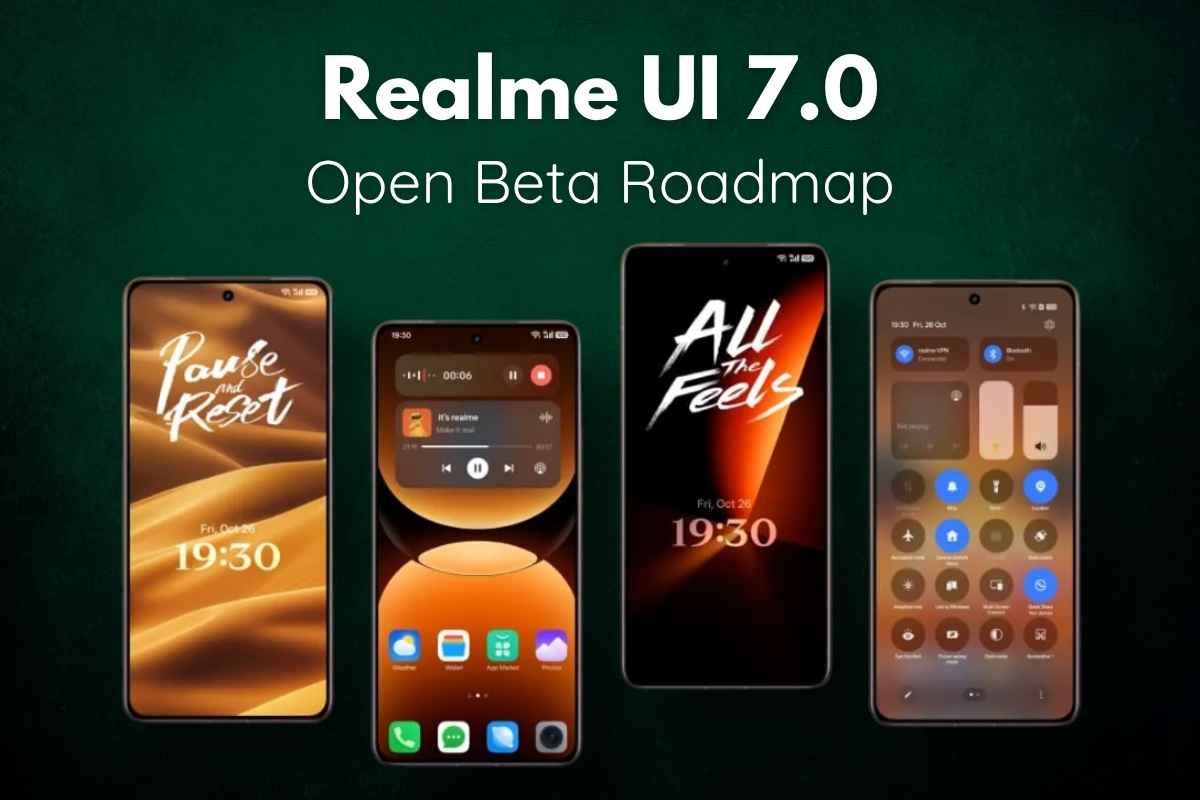
Realme has officially announced the Realme UI 7.0 Open Beta Roadmap, marking its biggest software upgrade based on Android 16. The update brings a brand-new design language, smoother animations, and powerful AI upgrades — plus a surprising feature that finally bridges Android and Apple ecosystems.
Whether you own a flagship GT series phone or a mid-range device, here is the complete list of Realme UI 7.0 features, eligible devices, rollout roadmap, and how to install the update safely.
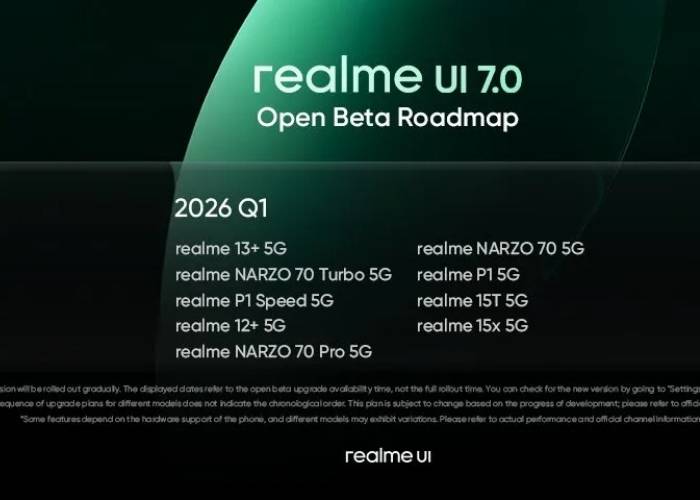
Realme UI 7.0 Update Overview (Android 16)
Realme UI 7.0 is designed to be smarter, smoother, and visually more premium than previous versions. The company started the early access programme with the Realme GT 7 Pro, and after three phases, it has now expanded to several mid-range devices as well.
Realme confirms that:
- More devices will be added soon
- Open Beta → Public Beta → Stable rollout
- Stable updates will roll out in phased batches to ensure quality
- Beta access depends on device health, region, and available slots
New Features in Realme UI 7.0 (Android 16)
Apple Watch Connect & iPhone Sync Support
One of the biggest surprises is Apple Watch support, a rare feature in Android skins.
Realme UI 7.0 now allows:
- Apple Watch Connect → Sync Apple Watch health data directly to your Realme phone
- iPhone Sync → Push calls and messages from an iPhone to Realme wearables
This is a huge step in cross-ecosystem connectivity and a major Realme USP in 2025.
New Light Glass Visual Design
Realme describes the UI as “Light Glass Design” — a fluid, transparent aesthetic with depth and layers.
Visual upgrades include:
- Transparent Control Center
- New 3D-style Breathing Dock
- More layered blur effects
- Smooth animations & transitions
Lock Screen Improvements:
- Live Photos & video wallpapers
- AI depth effects (clock moves behind subject)
- Customizable desktop icon sizes
Always-On Display:
- Panoramic AOD wallpapers
- Cleaner layout & dynamic information
Performance Boost with Flux Engine
Realme’s new performance system claims:
- 15% faster responsiveness
- 29% smoother scrolling
- Reduced app load time
- Better multitasking memory management
This makes the UI feel more fluid, especially on mid-range phones.
AI Upgrades
Realme UI 7.0 introduces several smart tools:
AI Notify Brief
- Bundles non-urgent notifications
- Delivers summaries in morning/evening
- Works like iOS notification digest
AI Gaming Coach
- Analyzes gameplay
- Suggests settings for smoother performance
AI Framing Master
- Real-time camera guide
- Helps users compose better photos
- Ideal for beginners in smartphone photography
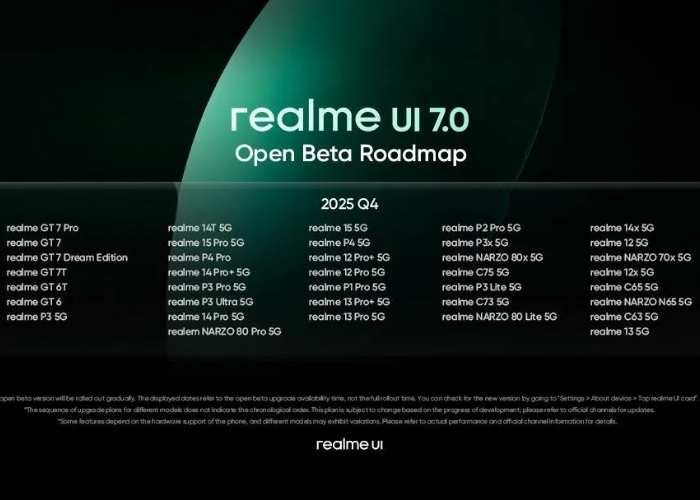
Realme UI 7.0 Beta Roadmap & Newly Added Devices (Wave 4)
Realme has begun Wave 4 of Early Access. Here are the latest devices receiving Realme UI 7.0 based on Android 16:
Newly Added Phones (Early Access Wave 4):
- Realme 14 Pro – RMX5056_15.0.0.1200
- Realme Narzo 80 Pro – RMX5033_15.0.0.1200
- Realme 14 Pro+ – RMX5051_15.0.0.1033
- Realme P3 Ultra – RMX5030_15.0.0.535
- Realme 14T – RMX5078_15.0.0.1207
Already Supported Devices (Previous Waves)
- Realme GT 7 Pro
- Realme GT 7
- Realme GT 6 Series
- Realme P3
- Other GT/P-series devices (more to join)
Note: Slots fill fast; apply early.
How to Apply for Realme UI 7.0 Early Access
Follow these steps:
Step 1: Enable Developer Mode
- Go to Settings
- Open About Device
- Tap Version
- Tap Version Number 7 times
- Wait for confirmation popup
Step 2: Submit Early Access Application
- Open Settings → About Device
- Tap the Realme UI 7.0 banner
- Select 3-dot menu (top-right)
- Choose Beta Programme → Early Access
- Tap Apply Now
- Fill in details & submit
If approved, the update arrives within a few days.
Complete Features Summary (Quick Bullet Points)
- Apple Watch Connect (sync health & fitness data)
- iPhone Sync for calls/messages to Realme wearables
- Light Glass transparent UI design
- Customizable lockscreen & icons
- Panoramic AOD
- Flux Engine → faster response + smoother scroll
- AI Notify Brief (notification digest)
- AI Framing in camera
- AI Gaming Coach
- Better battery & storage optimization
Conclusion
Realme UI 7.0 is one of the biggest software upgrades Realme has ever released. From its stunning Light Glass design to Apple Watch support and major AI additions, the update promises a modern and fluid experience.
If you own a supported device, applying for Early Access is the best way to experience Android 16 features right now. But if you prefer stability, wait for the final rollout — Realme has confirmed that more devices will join soon.
Read also: OnePlus 15 Full Specifications and Honest Review: Everything You Must Know Before Buying
Realme GT 8 Pro Launch Date in India Price and Full Specifications Unveiled
FAQs About Realme UI 7.0 Open Beta Roadmap Based on Android 16
1. Is my Realme phone eligible for Realme UI 7.0?
Wave 4 includes:
- Realme 14 Pro
- Realme 14 Pro+
- Realme 14T
- Realme Narzo 80 Pro
- Realme P3 Ultra
More models will be added soon.
2. How long does Early Access approval take?
Approval can take 1–5 days, depending on slots.
3. Will Realme UI 7.0 slow down my phone?
No. Flux Engine improves performance by 15–29%, making the UI faster.
4. Can I use Apple Watch with Realme UI 7.0?
Yes! Realme UI 7.0 introduces Apple Watch Connect, a rare Android feature.
5. When will the stable Realme UI 7.0 update roll out?
Realme will push stable builds after Open Beta ends, starting in batches.
6. Is Realme UI 7.0 safe to install?
Yes, but beta versions may contain minor bugs. Backup your data before updating.